TL;DR
To buy crypto in Canada, you fund an account with CAD, often by Interac e-Transfer, and place a market order (fast) or a limit order (price control). You then choose custodial or self-custody storage. Every step has costs and risks, including trading fees, network fees, price swings, and the chance of losing access to your funds.
About one in ten Canadians owns Bitcoin, according to the Bank of Canada, but many beginners are unsure what actually happens when they click "buy." This guide walks through the process step by step, from how trades are matched to how you move Canadian dollars in and out. You will learn about order types, Interac e-Transfer funding, fees, and storage, so you can make informed decisions at each stage.
How Many Canadians Own Crypto?
About 10% of Canadians owned Bitcoin in late 2023, and most owners hold it as an investment rather than to make payments. That finding comes from the Bank of Canada's Bitcoin Omnibus Survey, which has tracked awareness and ownership of crypto since 2016.
The Bank of Canada reports that Bitcoin ownership stayed stable at around 10% in 2023 and remained concentrated among men, younger people, and those with higher income and education. Most owners held relatively small amounts, with a median value of $500 CAD, and ownership of Ether was about 5% [Source]. Use of Bitcoin for everyday payments remained limited.
Awareness is much higher than ownership. In the Bank's earlier surveys, about 90% of Canadians had heard of Bitcoin since 2018 [Source]. Hearing about crypto is not the same as understanding how it works, and that gap matters when real money is involved.
The same earlier research found that about half of past and current Bitcoin adopters had experienced price crashes, loss of access to funds, scams, or data breaches. That is a sobering reminder that the risks in crypto are practical, not just theoretical. Many of these problems are linked to the steps covered in this guide: how you buy, where you store your assets, and how you protect your access.
Whether you live in Halifax, Winnipeg, or Kelowna, the basic process is the same. You move Canadian dollars onto a platform, place an order, decide how to store what you bought, and eventually sell and withdraw. If you are completely new to the technology behind crypto, our guide to what a blockchain is is a useful place to start.
How Crypto Trading Works: Order Books, Bids, and Asks
When you buy crypto on a trading platform, your order is usually matched with another person's order through a system called an order book. Knowing how the order book works explains why prices move, why fees and spreads matter, and why the price you see is not always the price you get.
Most Canadians who own Bitcoin got it through a platform rather than directly from another person. The Bank of Canada found that Bitcoin users most commonly obtained it through web or mobile platforms [Source]. On many of these platforms, trades run through an order book in the background, even if the app shows a simple "buy" button.
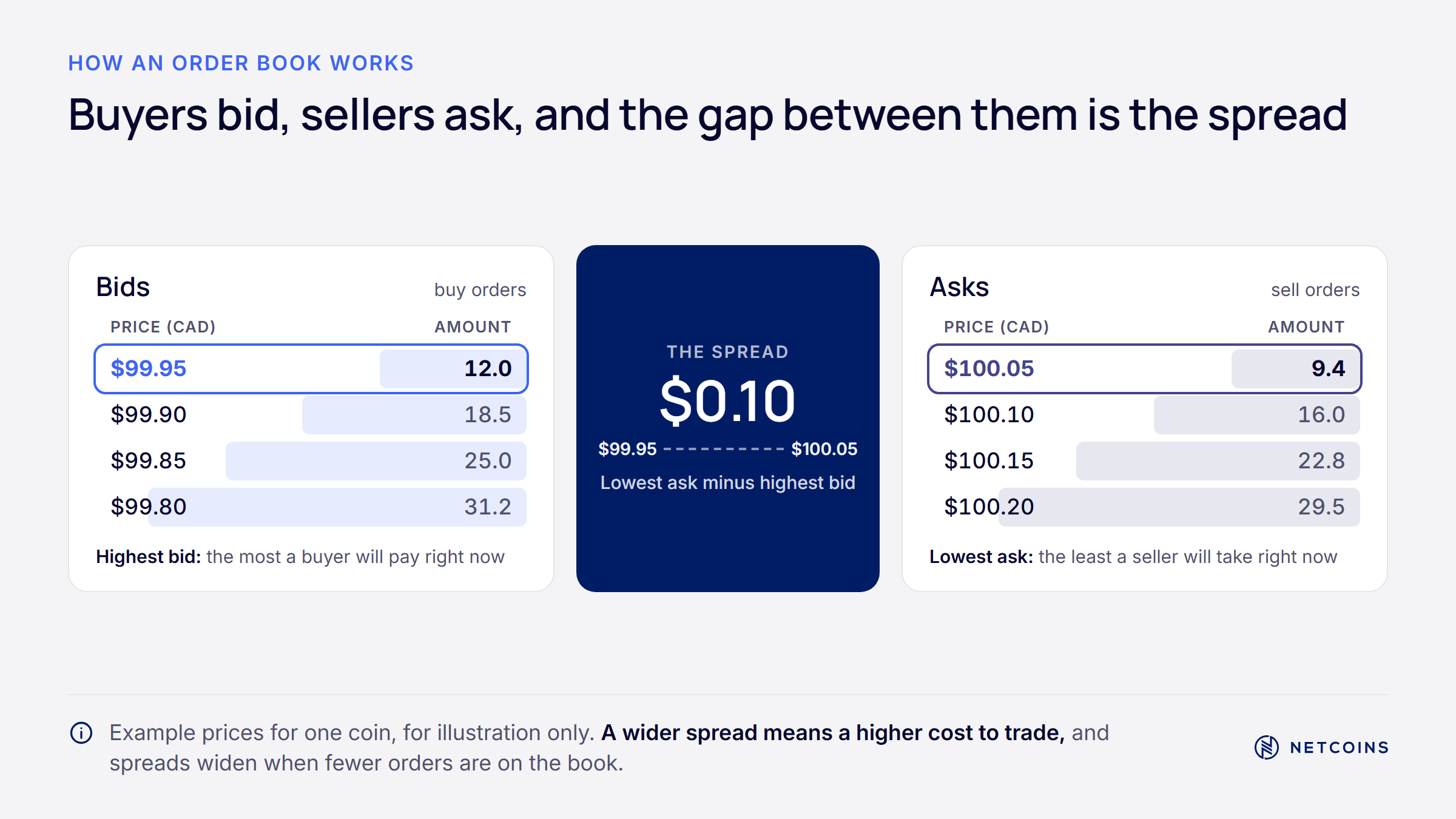
An order book is a live list of all open buy and sell orders for an asset. Buy orders are called bids, and they show the prices buyers are willing to pay. Sell orders are called asks, and they show the prices sellers are willing to accept. The highest bid and the lowest ask sit closest together at the top of the book.
The gap between the highest bid and the lowest ask is called the bid-ask spread. When many people are trading an asset, the spread is usually narrow. When trading is thin, the spread can widen, which makes it more expensive to buy and sell quickly. For example, if the best bid for a coin is $99.50 CAD and the best ask is $100.00 CAD, the spread is $0.50.
A piece of software called a matching engine pairs buy and sell orders when their prices meet. Many matching engines use price-time priority. This means the best price is matched first, and if two orders have the same price, the one placed earlier goes first. The process usually happens in a fraction of a second.
This matters for beginners because you are not buying from a fixed price list. The price you pay depends on the orders available at that moment. In a busy market, you may get close to the price you see. In a quiet market or during sharp price moves, the result can be different, which is where order types come in.
Market Orders vs. Limit Orders
A market order buys or sells right away at the best available price, while a limit order only executes at a price you choose or better. Market orders put speed first. Limit orders put price control first. Each has trade-offs that beginners should understand before placing a trade.
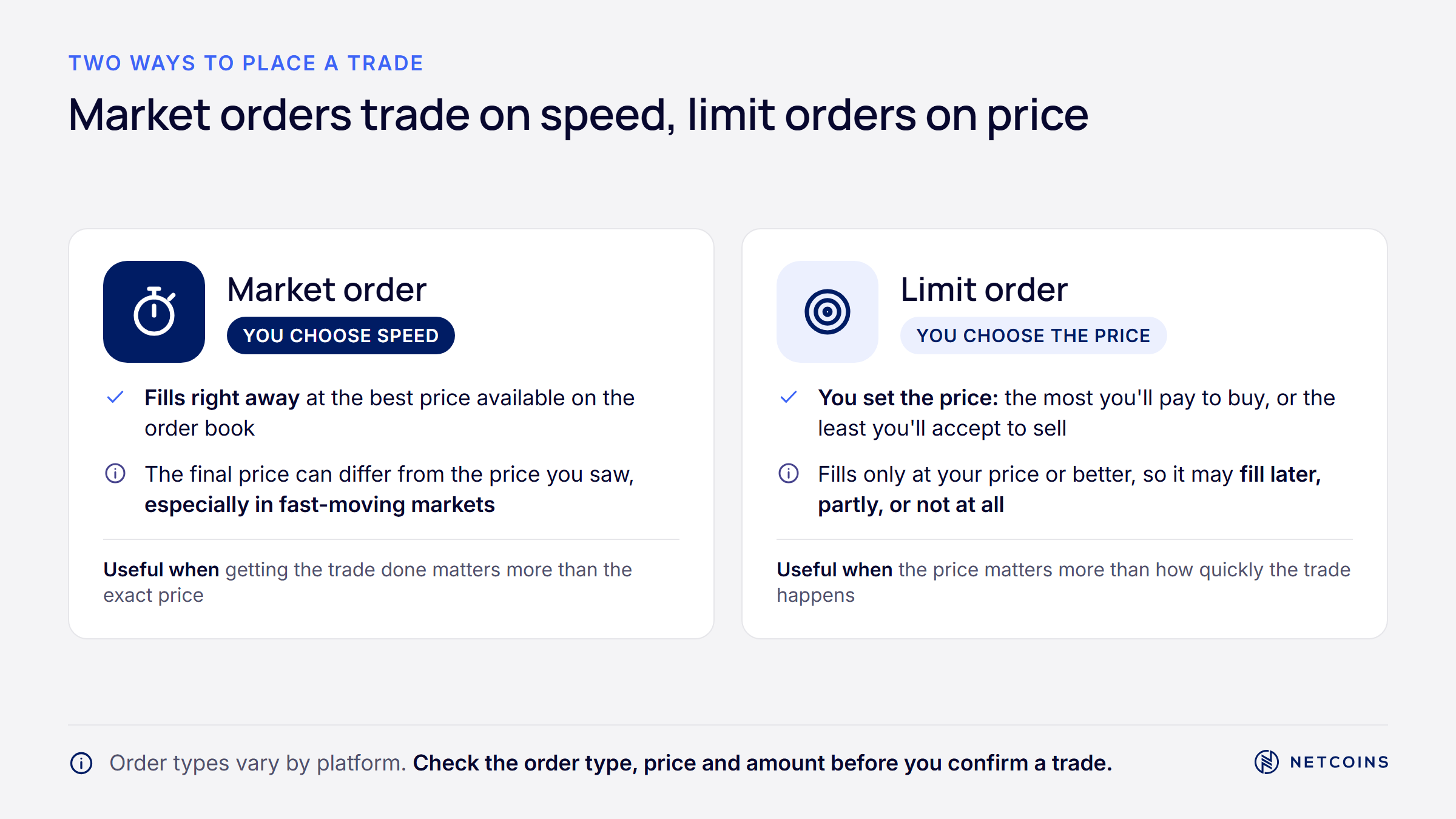
A market order tells the platform to fill your order immediately. It takes the best available asks when you buy, or the best available bids when you sell. Because it removes existing orders from the book, a market order is often called a "taker" order. When you are learning how to buy Bitcoin in Canada, this is usually the simplest order type you will see.
The main risk with a market order is slippage. Slippage happens when the final price is different from the price you saw before you confirmed. If your order is larger than the amount available at the best price, it fills at the next prices up the book. For example, a $5,000 CAD market order in a thin market might fill at an average price above the first quote.
A limit order lets you set the highest price you will pay to buy, or the lowest price you will accept to sell. If the market does not reach your price, the order waits in the book. Because it adds a new order to the book, a limit order is often called a "maker" order. Some platforms charge different fees for maker and taker orders.
The benefit of a limit order is price control. You will not pay more than your limit when buying. The trade-off is that your order may never fill if the price does not reach your level, or it may only partly fill. Prices can also move quickly past your limit, so a limit order does not protect you from losses after you buy.
Here is a simple way to compare them:
- Market order: fills right away, but the final price can differ from the quote, especially for larger orders or in quiet markets.
- Limit order: fills only at your price or better, but may not fill at all, or may fill only in part.
Neither order type is better in every case. The right choice depends on whether speed or price certainty matters more to you for a specific trade. Check your platform's fee schedule too, since fees can differ by order type.
How to Evaluate a Crypto Trading Platform
Choosing a platform starts with checking whether it is registered with the applicable Canadian securities regulators, and then reviewing its custody, fee, and risk disclosures. These documents tell you how your assets are held, what you will pay, and what could go wrong. Marketing claims are not a substitute for reading them. Keep in mind that registration does not mean a regulator has approved or endorsed a platform, and it does not make a platform safer or crypto trading lower risk.
The Bank of Canada research mentioned earlier found that about half of past and current Bitcoin adopters had faced price crashes, loss of access, scams, or data breaches [Source]. Platform choice cannot remove market risk, but it does affect how your assets are held and how problems are handled.
Start with the basics. Look for clear information on how the platform holds client assets, who its custody providers are, and what happens to your assets if the company runs into trouble. Review the fee schedule, including trading fees, spreads, deposit fees, and withdrawal fees. Check whether the platform offers two-factor authentication and other account security tools.
It also helps to understand how custody works in general. Crypto is controlled by private keys, which are secret codes that authorize transactions. If a private key is stolen, the assets it controls can be moved. Custody providers use different methods to protect keys. Cold storage keeps keys offline. Multi-party computation (MPC) splits signing power into separate pieces held in different places, so no single location holds a complete key.
These methods can reduce some risks, such as a single server being compromised. They do not remove all risk. Custody arrangements can still face operational failures, human error, or counterparty risk, which is the risk that the company holding your assets fails. Registration and custody practices do not reduce the investment risk of the crypto itself.
For reference, Netcoins works with Fireblocks and BitGo as custody partners. You can read how Netcoins approaches account protection on its safety and security page. Whichever platform you consider, a Canadian in Toronto or Saskatoon should ask the same questions: Is it registered? How are assets held? What are the fees? What are the risks? The answers help you understand how a platform operates, but they do not remove the risks of buying, selling, or holding crypto.
Funding Your Account With Canadian Dollars
Most Canadians fund a crypto account by sending Canadian dollars from their bank, usually by Interac e-Transfer or, for larger amounts, a bank wire. The method you choose affects how fast your funds arrive, how much you can send at once, and whether any fees apply.
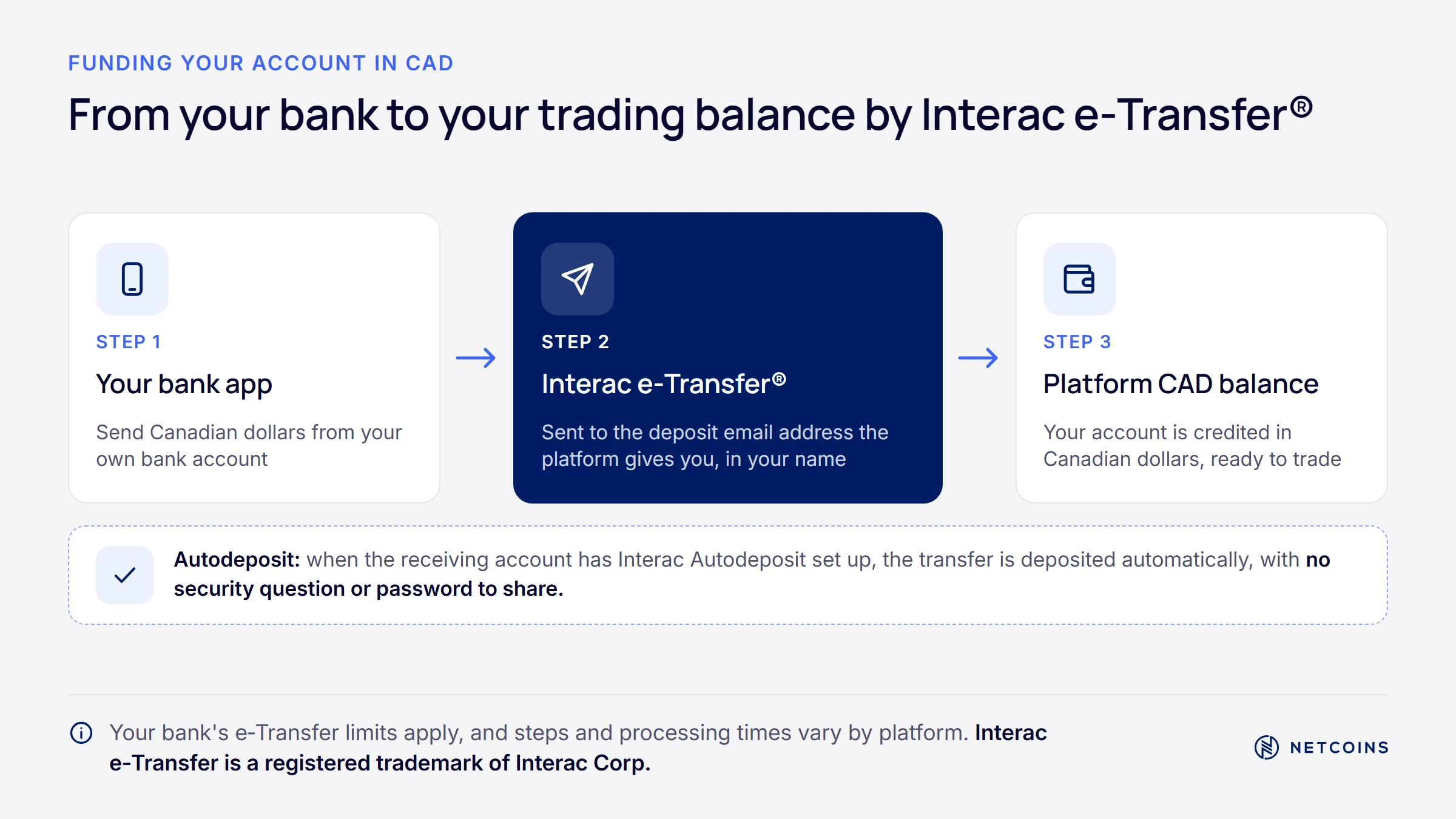
Interac e-Transfer is built into the online banking of most Canadian financial institutions. You send money from your bank to the platform, and the platform credits your account once the funds arrive. Timing depends on your bank and the platform. Our guide on how Interac e-Transfer works for crypto explains the steps in more detail.
Many platforms use Interac Autodeposit to receive funds. According to Interac, when Autodeposit is set up, no security question is needed and the money is deposited automatically after routine fraud checks by the financial institution [Source]. This removes the step of creating and sharing a security answer, which is one way transfers can be intercepted.
Your bank sets limits on how much you can send by Interac e-Transfer. Limits usually apply per transaction, per day, per week, and per month, and they vary by bank, account type, and even account age. Before you plan a larger purchase, check your current limits in your banking app or with your bank. Limits can often be changed on request, but not always right away.
For amounts above your e-Transfer limits, many platforms accept bank wires. Wires are designed for larger transfers but are processed through the banking system, so they can take longer to arrive, often one or more business days. Your bank may charge a fee to send a wire, and some platforms charge fees on smaller wires. Check the Netcoins fee schedule or your own platform's fee page for current details.
A few safety habits help. Only send funds to the deposit details shown inside your account on the platform, never to details sent by email, text, or social media. Be wary of anyone who asks you to send money to "help" with a crypto purchase. Scammers often pose as support staff or advisors. Our guide to common crypto scams in Canada covers the warning signs.
Understanding Trading Fees and Network Fees
Buying and selling crypto can involve two different kinds of costs: fees charged by the platform and fees paid to the blockchain network. Platform fees apply when you trade. Network fees usually apply when you send crypto from one wallet or platform to another.
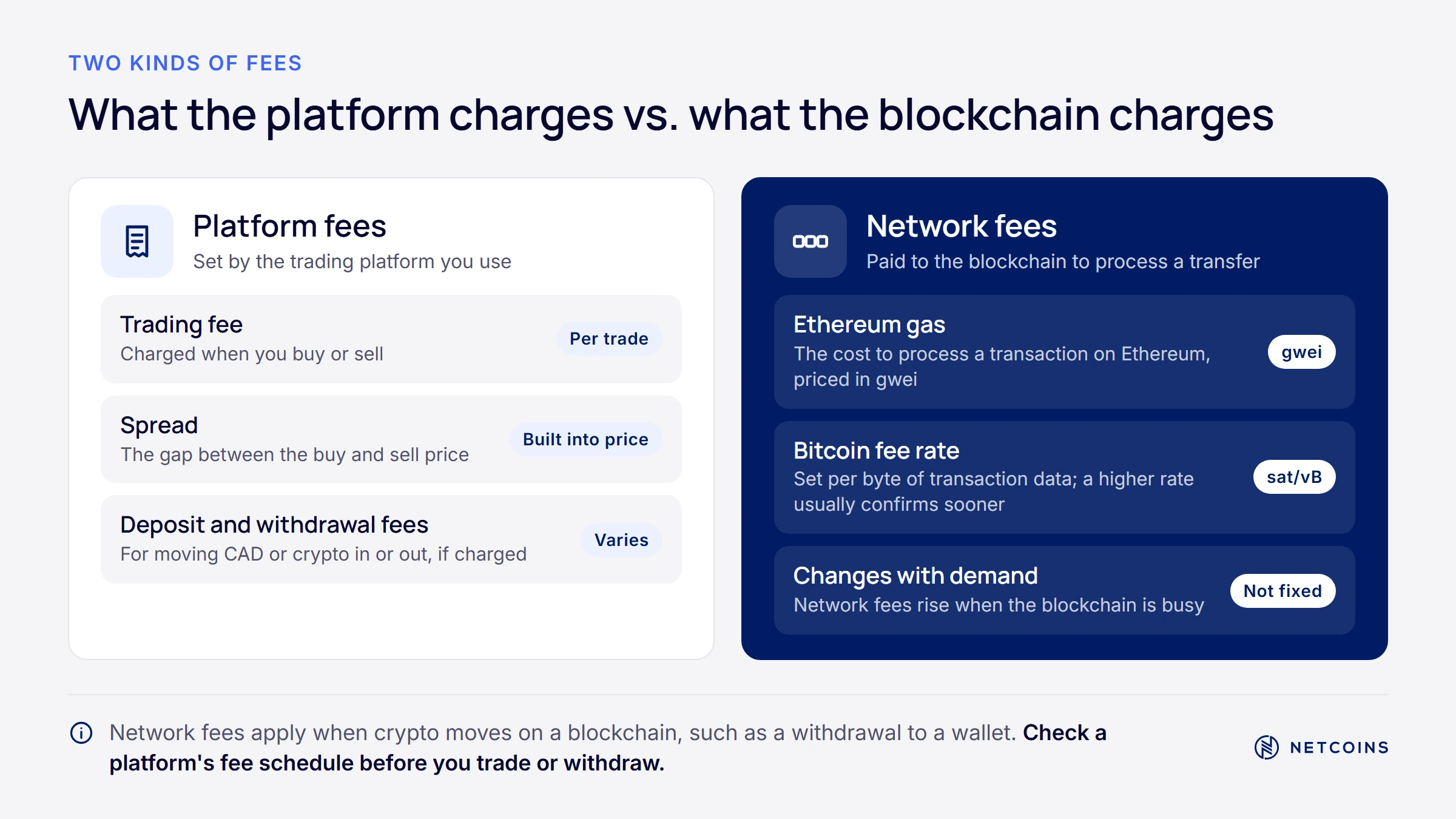
Platform fees can include a trading fee, often a percentage of the trade, and a spread, which is the difference between buy and sell prices. Some platforms also charge deposit or withdrawal fees. Always check the full fee schedule before trading, because a low headline trading fee does not tell you the total cost. A $1,000 CAD trade can cost noticeably different amounts on different platforms once spreads and fees are added.
Network fees are paid to the validators or miners who process transactions on a blockchain. They are set by the network, not the platform, and they change with demand. When many people are sending transactions at once, fees usually rise. When the network is quiet, fees usually fall.
On Ethereum, network fees are called gas. Since the London upgrade on August 5, 2021, Ethereum fees have been split into a base fee, which is burned, and a priority fee, which works like a tip to encourage faster processing [Source]. The base fee rises when demand is high and falls when demand is low. Burning part of the fee does not by itself support or raise the price of ETH.
Some users send Ethereum-based tokens on Layer 2 networks, which process transactions separately and then post data back to Ethereum. Layer 2 fees are often lower, but these networks add their own risks, including bridge, operator, and smart-contract risk. Make sure the platform or wallet you are sending to supports the exact network you choose, or funds can be lost.
Bitcoin fees work differently. They are based on the data size of a transaction, not the dollar amount being sent. Unconfirmed transactions wait in a queue called the mempool, and miners generally choose transactions that pay higher fee rates first. A transaction that combines many small incoming payments uses more data, so it can cost more to send than one using a single larger payment.
Storing Crypto: Custodial vs. Self-Custody Wallets
After you buy crypto, you can leave it with the platform (custodial storage) or move it to a wallet where you generally control the private keys (self-custody). Custodial storage is simpler. Self-custody gives you more direct control, but it also puts the full responsibility for security and backups on you.
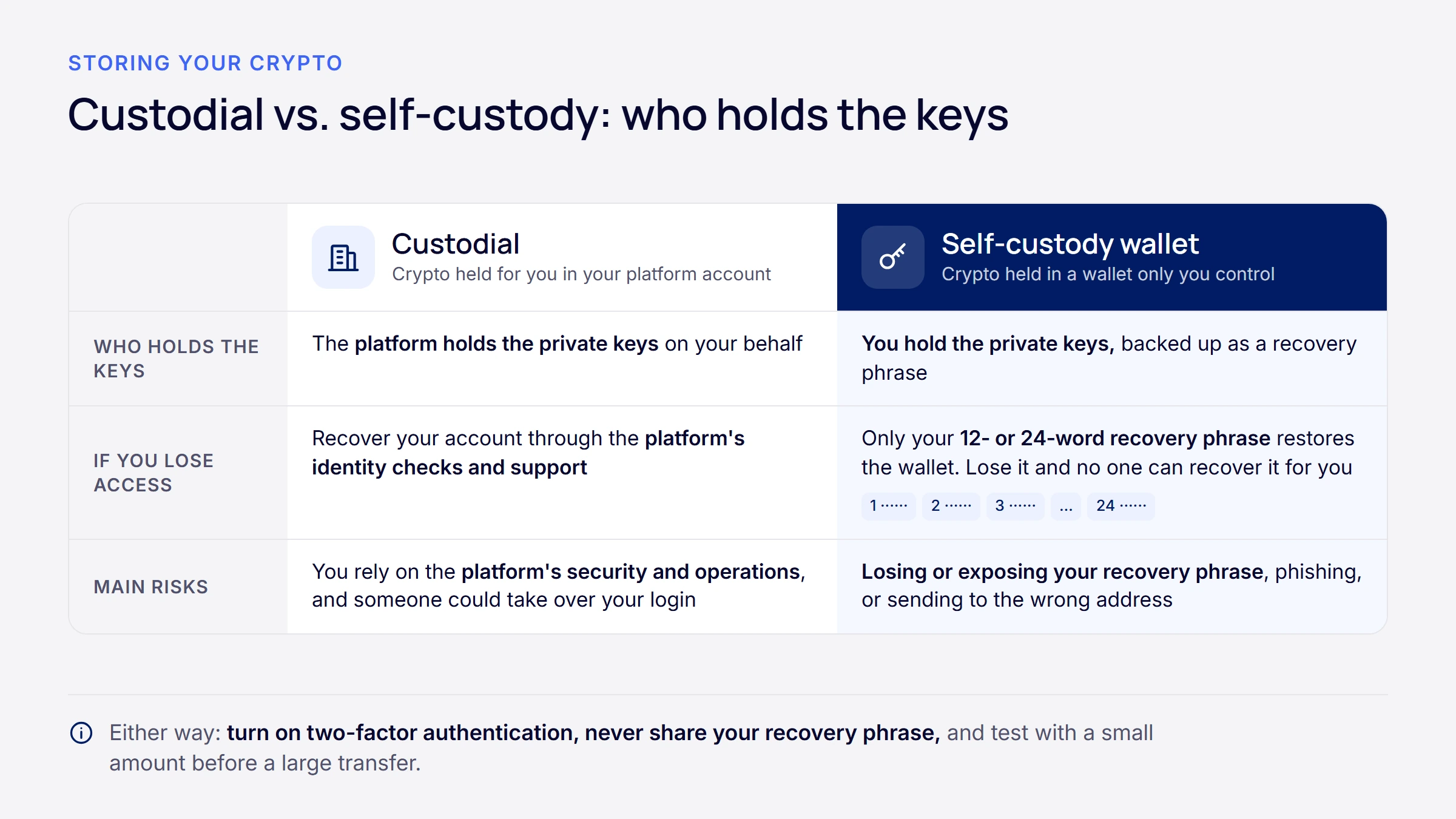
With custodial storage, the platform holds the private keys and keeps a record of what you own. The main benefit is convenience. If you forget your password, you can usually recover access through identity checks and customer support. The main risk is counterparty risk: you rely on the platform's security, operations, and financial health to access your assets.
With self-custody, you generally control the private keys and transactions, subject to the wallet, network, smart-contract and other technical characteristics involved. A software wallet or a hardware wallet creates these keys for you. The trade-off is that there is no customer support to recover access. You are also responsible for avoiding phishing links, fake wallet apps, and sending errors, which usually cannot be reversed on a blockchain.
When you set up a self-custody wallet, it gives you a recovery phrase, usually 12 to 24 words. Anyone with this phrase can control your funds. If you lose it and your device fails, your funds may be permanently lost. Never share it, type it into a website, or store it in cloud files or photos. Legitimate support staff will never ask for it.
Here is a simple comparison:
- Custodial storage: the platform holds the keys; account recovery is possible; you depend on the platform's security and solvency.
- Self-custody: you generally hold the keys; no one can recover them for you; you are responsible for backups, device security, and avoiding scams.
Some people use both, keeping part of their holdings on a platform and part in a self-custody wallet. There is no single right answer. The best choice depends on how comfortable you are managing keys and backups, how often you trade, and which risks you prefer to manage yourself.
How to Sell Crypto and Withdraw CAD
Selling crypto and withdrawing Canadian dollars follows the funding and buying process in reverse. You place a sell order on the platform, the proceeds are credited to your CAD balance, and then you withdraw that balance to your bank account.
When you sell, you can use a market order to sell right away at the best available bid, or a limit order to set the lowest price you will accept. The same trade-offs apply as when buying: market orders are fast but can fill at a different price, while limit orders give price control but may not fill. If you hold crypto in a self-custody wallet, you first need to send it back to the platform, which usually involves a network fee.
Withdrawals to your bank often use the same rails as deposits. Smaller amounts may be withdrawn by Interac e-Transfer, while larger amounts may go by bank wire. Processing times depend on the platform and your bank, and some methods carry fees. Check your platform's withdrawal options and fees before you sell, so you know how long it may take to receive your Canadian dollars.
A few practical points help avoid delays. Make sure the bank account you withdraw to is in your own name. Double-check crypto addresses carefully if you move assets between wallets, since mistakes on a blockchain usually cannot be undone. Keep records of your trades, including dates, amounts, and prices, in case you need them later.
Prices can move quickly between the time you decide to sell and the time your order fills. A coin quoted at $100 CAD might fill lower in a fast-moving market, especially with a market order. For a refresher on the full process from start to finish, see our step-by-step guide to buying Bitcoin in Canada, which covers account setup, funding, and your first trade.
People Also Ask About Buying and Selling Crypto
What is the minimum amount of crypto I can buy?
Most platforms let you buy a fraction of a coin, so you do not need to buy a whole Bitcoin to get started. Crypto assets are divisible into very small units, and Bitcoin's smallest unit is called a satoshi. Minimum purchase amounts are set by each platform and can change, so check your platform's current minimums before trading. Starting small does not remove risk. Even a small amount of crypto can lose value quickly, so only use money you can afford to lose.
How long does a crypto trade take to go through?
A market order usually fills within seconds, while a limit order fills only if and when the market reaches your price. Market orders are matched right away with the best available orders in the order book. Limit orders can take minutes, days, or may never fill if the price does not reach your level. Separately, sending crypto between wallets depends on the blockchain network, and confirmation times vary by network and by how busy it is.
Can I cancel a crypto transaction?
You can usually cancel an open order that has not filled yet, but a confirmed blockchain transaction generally cannot be reversed. If you placed a limit order that is still waiting in the order book, most platforms let you cancel it. Once a trade has filled, or once a transfer between wallets is confirmed on the blockchain, it is final. This is why it is important to double-check amounts, order types, addresses, and networks before you confirm.
Are there fees for depositing Canadian dollars?
It depends on the platform and the funding method you use. Some platforms do not charge for certain deposit methods, while others charge fees on specific methods or amounts, such as smaller bank wires. Your own bank may also charge fees, depending on your account package. Always check both your platform's fee schedule and your bank's terms. For Netcoins, current deposit and trading fees are listed on the Netcoins fees page.
Why is crypto priced differently on different platforms?
Each platform has its own buyers, sellers, and order book, so prices can differ slightly from one platform to another. Traders who buy on one platform and sell on another tend to narrow these gaps, but small differences can still appear, especially during fast market moves. Spreads and fees also affect the price you actually pay or receive. When comparing platforms, look at the total cost of a trade, not just the displayed price.
Frequently Asked Questions
What happens if a crypto platform goes offline while I am trading?
If a platform goes offline, orders that were already matched before the outage are generally recorded, while open orders may stay active or be paused depending on the platform. During an outage, you may not be able to place, change, or cancel orders, and prices can keep moving on other platforms. That is one reason to avoid relying on a single last-minute trade. Check your platform's status page and terms of service to understand how it handles outages, and contact support if your balance or order history looks wrong afterward.
Do I own my crypto if I leave it on a platform?
When you leave crypto on a platform, you have a claim to those assets, but the platform holds the private keys that control them. You are exposed to the asset's price, and you rely on the platform's security, operations, and financial health to access your holdings. This is different from self-custody, where you generally hold the keys yourself. Before choosing a platform, review its custody disclosures to understand how client assets are held, who the custody providers are, and what protections apply if the company faces problems.
Why did my market order fill at a different price than I expected?
Your market order likely filled at a different price because of slippage. A market order takes the best available prices in the order book, and if your order is larger than the amount available at the best price, the rest fills at the next available prices. Slippage is more common with large orders, in quiet markets, and during sharp price moves. Using a limit order can help you control the price you pay, but it comes with the trade-off that your order may not fill at all.
Can I send crypto directly to another person?
Yes, you can send crypto directly from your wallet or platform account to another person's wallet address. The transfer happens on the blockchain and usually requires a network fee. Transfers can be sent at any time, but they generally cannot be reversed once confirmed. Always double-check the address and the network before sending, since sending to the wrong address or an unsupported network can result in permanent loss. Be cautious of anyone who asks you to send crypto unexpectedly, as this is a common scam tactic.
How should I store a wallet recovery phrase?
Many people store a wallet recovery phrase offline, written on paper or stamped into metal, and kept somewhere secure such as a home safe. The key goal is to keep it away from internet-connected devices and away from other people. Avoid photos, cloud notes, email, or typing it into any website. Anyone with your recovery phrase can control your funds, and legitimate support staff will never ask for it. Some people keep more than one secure copy in different locations to reduce the risk of loss from fire or damage.
Quick Glossary
- Ask: a sell order in the order book, showing the lowest price a seller will accept.
- Bid: a buy order in the order book, showing the highest price a buyer will pay.
- Bid-ask spread: the difference between the highest bid and the lowest ask.
- Order book: a live list of all open buy and sell orders for an asset on a platform.
- Matching engine: the software that pairs buy and sell orders when their prices meet.
- Mempool: the waiting area where unconfirmed Bitcoin transactions sit before miners add them to a block.
- Multi-party computation (MPC): a custody method that splits signing power into separate pieces so no single location holds a complete private key.
- Slippage: the difference between the price you expected and the average price your order actually fills at.
Key Takeaways
- About 10% of Canadians owned Bitcoin in 2023, mostly as an investment, according to the Bank of Canada.
- Market orders fill quickly but can suffer slippage. Limit orders give price control but may not fill.
- Check whether a platform is registered with the applicable Canadian securities regulators, and review its custody, fee, and risk disclosures. Registration is not an endorsement and does not make crypto lower risk.
- Interac e-Transfer and bank wires are common ways to move CAD in and out. Limits, timing, and fees depend on your bank and platform.
- Custodial storage offers account recovery but relies on the platform. Self-custody generally gives more direct control but puts full responsibility for keys and backups on you.
Buying and selling crypto is simpler once you understand what happens behind each click: how orders are matched, what you pay in fees, and who holds your keys. Taking time to learn these basics helps you avoid common and costly mistakes. To see how funding, trading, and withdrawals are laid out in practice, you can explore how the Netcoins app works.

About Netcoins
Established in 2014 in Vancouver, British Columbia, Netcoins is a registered Restricted Dealer with the provincial securities commissions and a registered Money Services Business (MSB) with FINTRAC. Netcoins is owned by Surge Digital Inc. (formerly BIGG Digital Assets Inc.), a publicly traded company listed on the TSX Venture Exchange (TSXV: SRGE), and complies with applicable public company regulatory.
The information provided in the blog posts on this platform is for educational purposes only. It is not intended to be financial advice or a recommendation to buy, sell, or hold any cryptocurrency. Always do your own research and consult with a professional financial advisor before making any investment decisions. Cryptocurrency investments carry a high degree of risk, including the risk of total loss. The blog posts on this platform are not investment advice and do not guarantee any returns. Any action you take based on the information on our platform is strictly at your own risk. The content of our blog posts reflects the authors’ opinions based on their personal experiences and research. However, the rapidly changing and volatile nature of the cryptocurrency market means that the information and opinions presented may quickly become outdated or irrelevant. Always verify the current state of the market before making any decisions.