TL;DR
Before you confirm any crypto transfer, verify the address, the network, a compatible address format, and any required destination tag or memo. Checksums catch most typos but cannot spot a scammer's valid address, and address poisoning tricks people into copying lookalike addresses from their own history. Features like address whitelisting and two-factor authentication add protection, but careful checks are still your main defence.
Sending crypto can feel stressful, and for good reason. A bank can sometimes reverse a mistaken transfer, but a blockchain usually cannot. This guide explains in plain language what happens when crypto goes to the wrong place, how address checksums work, why Bitcoin has several address formats, and how to avoid the wrong-network mistake. It also covers address poisoning scams and how withdrawal safeguards such as whitelisting work on Netcoins.
What Happens If You Send Crypto to the Wrong Address?
If you send crypto to a valid but wrong address, the transaction usually cannot be reversed, cancelled, or refunded once it is confirmed.
When you send crypto, your wallet signs a transaction and broadcasts it to the network. Validators or miners add it to a block based only on those instructions. If the address is valid but belongs to someone else, the funds settle in that person's wallet. There is usually no central help desk that can roll it back. The only realistic option is to identify the owner and ask for a voluntary return, which is rarely possible.
Netcoins' own help centre puts it plainly: crypto withdrawals are non-reversible, so users should double-check that a wallet address is correct, accessible, and in their possession [Source].
If the address is invalid, meaning it breaks the network's formatting rules, most wallets and platforms will block the transaction before it is sent. That safety check usually comes from a checksum, which is covered in the next section.
A simple habit helps more than any tool. If you are moving $2,000 worth of bitcoin from a platform to your own wallet in Saskatoon, check any withdrawal and deposit minimums before sending a small test amount. Confirm that the test amount arrived in the receiving wallet or was credited by the receiving platform before sending the rest. Test transactions cost an extra fee, but they can catch a wrong address or network before most of your funds are at risk.
If you are new to crypto in general, our step-by-step guide to buying Bitcoin in Canada explains account setup, identity verification, and Interac e-Transfer funding before you ever need to send crypto.
How Checksums Catch Typos, and What They Miss
A checksum is a small piece of data built into an address that lets a wallet or platform detect most typing and copying errors, when the software checks it.
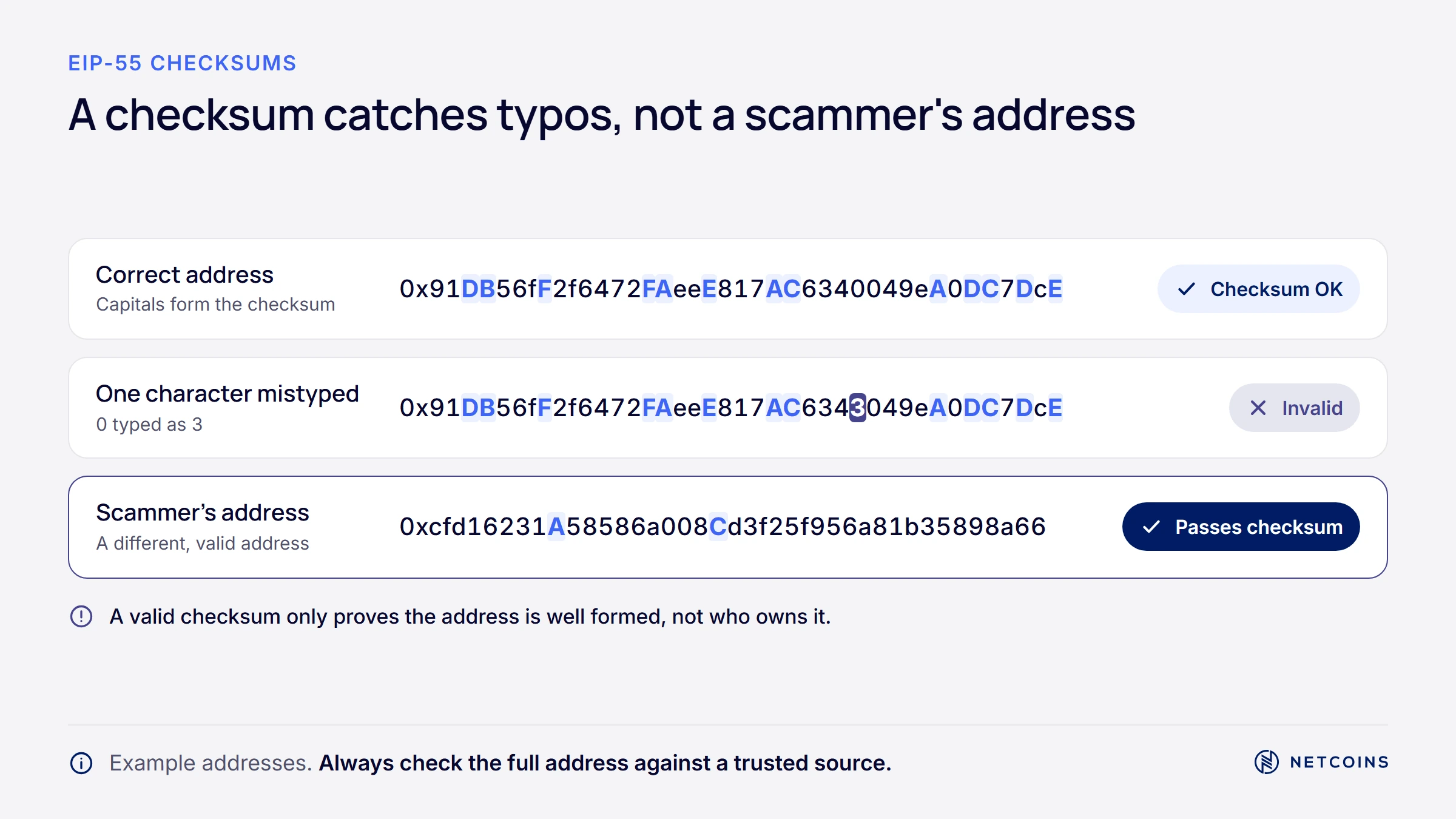
When a wallet or platform checks an address checksum, it can reject an address that fails the check. Whether the check is enforced depends on the address format and the software you use. Verify the full address even if the app accepts it. Bitcoin addresses have built-in checksums in every format.
Ethereum addresses are 40 hexadecimal characters after a "0x" prefix. Originally, they had no checksum. The EIP-55 standard, created in January 2016, added one by using a mix of uppercase and lowercase letters [Source].
Here is how EIP-55 works in simple terms. The wallet takes the lowercase address and runs it through the Keccak-256 hash function. For each letter (a to f) in the address, it checks the matching part of the hash. If that part is high enough, the letter is shown in uppercase; otherwise it stays lowercase. Changing even one character changes the hash, which breaks the capitalization pattern. According to the standard, the chance that a randomly mistyped address still passes the check is about 0.0247% [Source].
There are two important limits:
- All-lowercase addresses skip the check. If an Ethereum address is written entirely in lowercase, a wallet has no capitalization pattern to verify, so a typo may not be caught.
- Checksums cannot detect scams. A checksum only proves an address is correctly formed. It cannot tell you who owns it. If you copy a scammer's valid address, the checksum will pass.
That second limit is why address poisoning works, and why checking the address against a trusted source matters more than the checksum itself.
Bitcoin Address Formats: Legacy, SegWit, and Taproot
Bitcoin has several address formats that came from network upgrades over time, and you can usually tell them apart by their first characters.
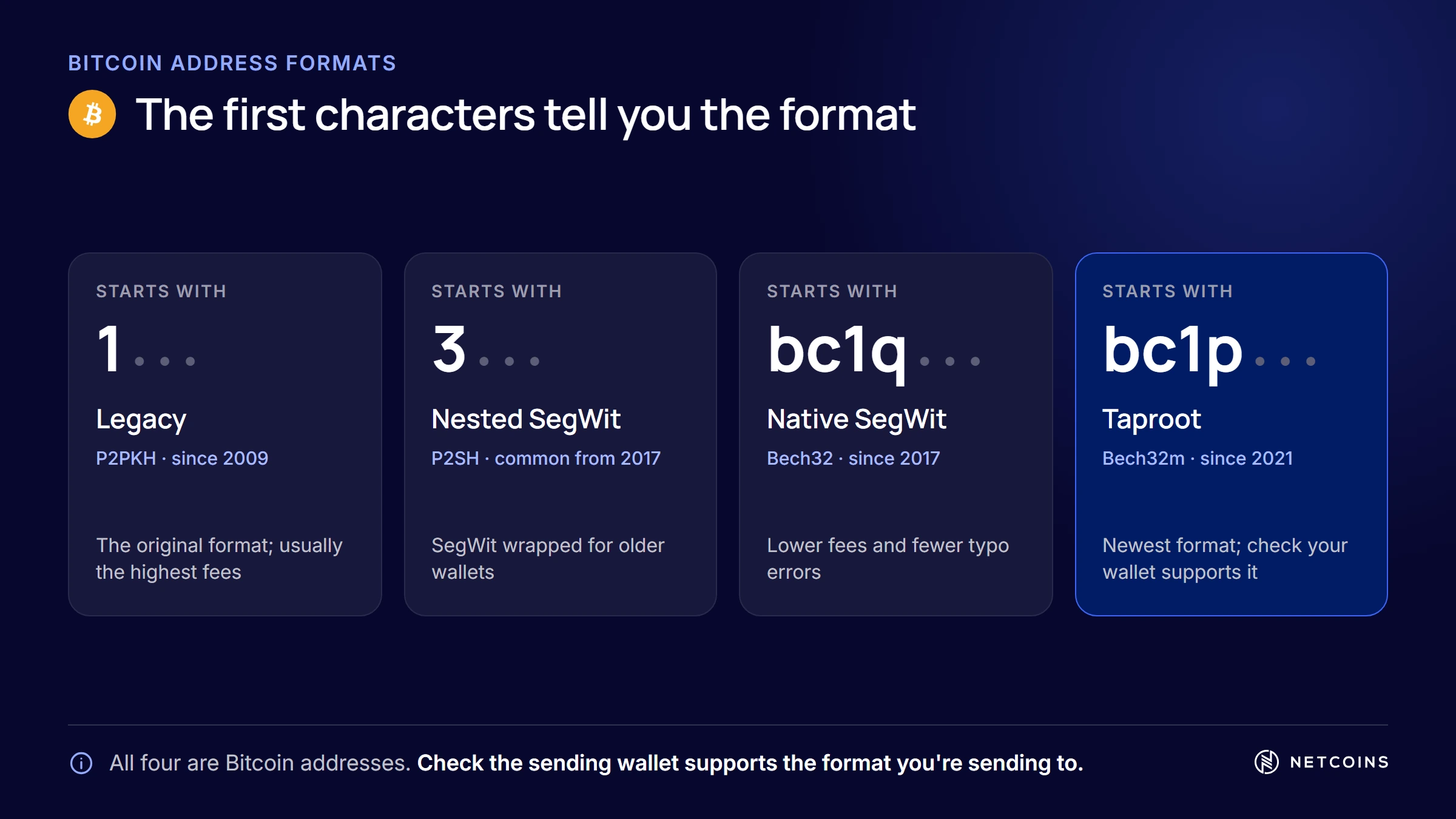
The main formats are:
- Legacy (P2PKH), starts with "1": The original format. These transactions use more block space, so they usually cost more in network fees.
- Nested SegWit (P2SH), starts with "3": A format that let older software work with SegWit, a later upgrade that reduced the space transactions take up.
- Native SegWit (P2WPKH), starts with "bc1q": Uses Bech32 encoding, which is all lowercase and avoids some lookalike characters. It usually costs less in fees than Legacy.
- Taproot (P2TR), starts with "bc1p": Uses Bech32m encoding and supports newer features that can improve privacy for more complex transactions.
All of these are Bitcoin addresses on the same network, so sending between formats generally works. For example, you can usually send from a Legacy address to a Native SegWit address. The main exception is older software: a wallet or service that does not support a newer format may not be able to send to it.
The format matters most when you withdraw to your own wallet. Buying crypto through a trading platform may give you exposure to the underlying asset rather than direct ownership, depending on the platform's terms. While it stays on the platform, you rely on the platform's custody arrangements, and the platform handles its own address formats. If you withdraw it to a self-custody wallet, you control the keys and are responsible for keeping them secure, and the wallet you set up decides the format, and many newer wallets use Native SegWit or Taproot by default. Our guide to hardware wallets in Canada explains how to set up and check a receiving address on a device's own screen.
For a Canadian moving bitcoin from a platform to a wallet in Regina, the practical check is simple: confirm the receiving address starts with a prefix your sending platform supports, and verify it on the receiving device before you paste it.
How to Avoid Sending Crypto to the Wrong Network
Before you send, confirm that the network selected on the sending side matches the network the receiving wallet or platform expects.
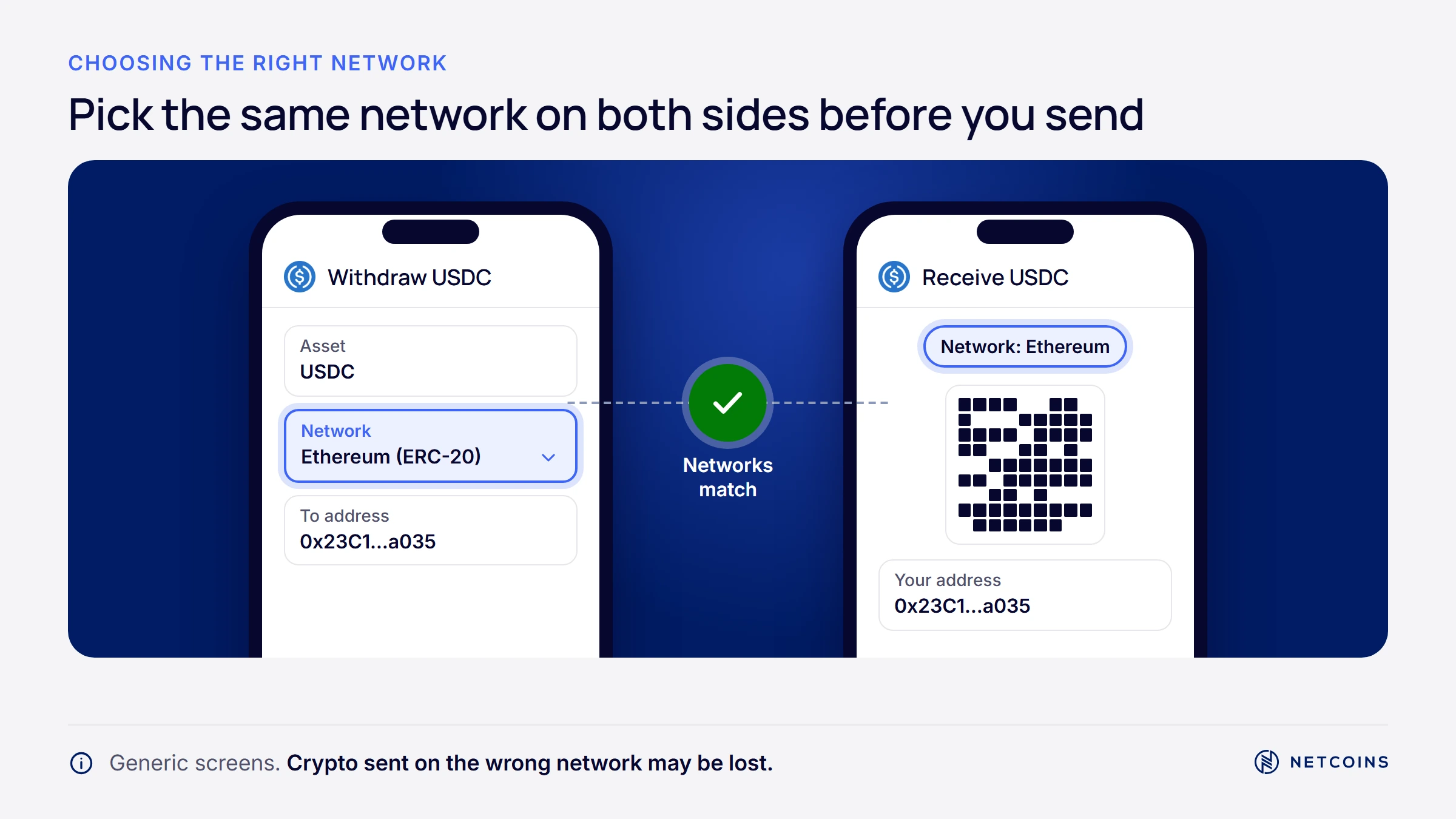
Many assets exist on more than one blockchain. The same token can be issued on several networks, and the same ETH can sit on Ethereum or on a layer 2 network. Each version is tracked separately. If you send on one network but the recipient is only watching another, the funds may not arrive where you expect.
The most confusing case involves networks that use the Ethereum Virtual Machine (EVM), such as Ethereum, Polygon, Arbitrum, and Avalanche. These networks use the same address format, so a wallet's 0x address often looks identical on all of them. You cannot tell which network an address is "for" by looking at it.
For example, imagine a user in Edmonton withdraws ETH to their own wallet but picks Arbitrum instead of Ethereum in the network menu. The ETH arrives at their address on Arbitrum. Their wallet, set to show Ethereum, displays no new balance, even though the funds are there on another network.
Some networks, such as the XRP Ledger and Stellar, also use a destination tag or memo. Platforms often use one shared deposit address for many users and rely on the tag or memo to know which account to credit. If you leave it out or enter it wrongly, the funds may reach the platform but not be credited to your account.
Practical checks before you send:
- Match the network label exactly. Compare the network shown on the receiving screen with the network selected on the sending screen.
- Confirm the asset is supported on that network. A platform may accept a token on one network but not another.
- Check you have the network's fee asset. Sending a token often requires a small amount of the network's native coin to pay the fee.
- Include any required destination tag or memo. Enter it exactly as shown by the receiving wallet or platform.
- Check minimums, then send a test amount. For a new address or network, check any withdrawal and deposit minimums before sending a small test amount. Confirm it arrived or was credited before sending the rest.
Netcoins' help centre lists the networks it supports for deposits and reminds users that they are responsible for checking the currency, network, and address before sending [Source]. Our Beginners Guide To Ethereum explains how Ethereum and layer 2 networks relate.
Can You Recover Crypto Sent to the Wrong Network?
Sometimes, but not always: recovery depends on who controls the receiving address and whether the two networks are compatible.
If you control the receiving wallet's keys. If you sent funds on the wrong EVM network to a standard wallet you control, the same recovery phrase often controls the same address on the other network. You can usually add that network to your wallet, view the funds, and move them. This is not guaranteed. Some wallets, especially smart contract wallets such as many multisig setups, may not have the same address on every network, and funds sent there may be hard or impossible to reach.
If the receiving address belongs to a platform. If you send crypto to a platform deposit address using a network it does not support, you do not control the keys, so you cannot recover the funds yourself. Recovery depends entirely on the platform's policy and technical ability. Netcoins' help centre says funds sent to Netcoins must be compatible with its systems, and that coins sent to the incorrect address are irretrievable and will result in loss of funds [Source].
If the networks are incompatible. Most wallets will stop you from sending bitcoin to an Ethereum address because the formats do not match. If a transfer somehow reaches an address no one controls, the funds are usually lost permanently.
If you make a mistake, act quickly and carefully:
- Check the transaction on a block explorer for the network you actually used.
- If it went to your own wallet, add that network in your wallet and check the balance.
- If it went to a platform, contact its support team with the transaction ID.
- Be wary of "recovery services" that contact you first or ask for your recovery phrase. These are a common scam.
Address Poisoning: Why You Should Not Copy From History
Address poisoning is a scam in which an attacker places a lookalike address in your transaction history, hoping you will copy it the next time you send.
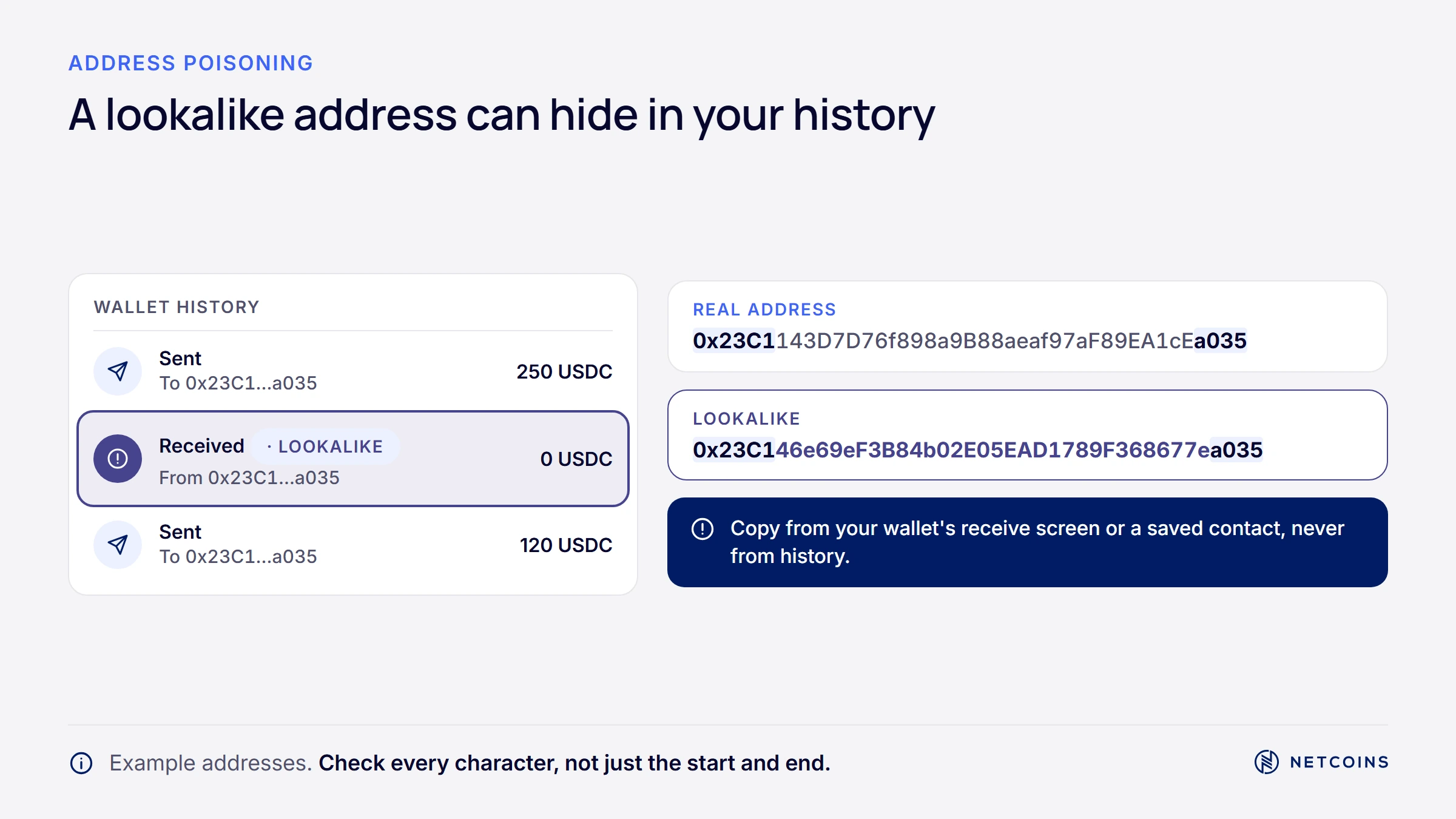
Many people copy addresses from their recent transactions to save time. Attackers exploit this. They generate an address whose first and last characters match one you use, then send you a tiny or zero-value transfer from it so the fake address appears in your history. If you later copy that address, your funds go to the attacker.
The scale is large. Researchers at Carnegie Mellon University measured address poisoning over two years on two EVM-compatible blockchains. They identified more than 270 million attack attempts targeting more than 17 million victims, and 6,633 successful thefts totalling at least US$83.8 million [Source]. The study also found victims were more likely to pick a lookalike address that looked more similar or appeared earlier in their history [Source].
Checksums do not help here, because the attacker's address is perfectly valid. A related tactic, "dusting," sends tiny amounts of crypto to many wallets, often to track activity. Dust is usually best left alone.
Ways to reduce your risk:
- Never copy addresses from your transaction history. Get a fresh address from the recipient or from the official deposit screen.
- Use a saved address book or whitelist for addresses you send to often.
- Check the whole address, not just the first and last few characters.
- Watch for clipboard malware. If the address you paste does not match the one you copied, stop and check your device for malware.
Our guide to common Bitcoin scams in Canada covers other tactics, and Netcoins' help centre has its own guide to avoiding cryptocurrency scams.
Address Whitelisting and Other Withdrawal Safeguards
Address whitelisting lets you save and pre-approve trusted withdrawal addresses, which reduces the chance of sending to a wrong or unfamiliar address.
Platforms use whitelisting in different ways. On some platforms, turning it on means withdrawals can only go to addresses on the approved list. On others, it works as a saved list of trusted addresses with extra checks for new ones. It helps to read how your platform's version works.
On Netcoins, address whitelisting is optional. Whitelisting an address, or withdrawing to an address that is not whitelisted, requires two verification codes. Users can still choose "Manual Entry" to check an address during each withdrawal instead of saving it [Source].
Netcoins also requires two-factor authentication (2FA) before users can withdraw funds [Source]. When someone logs in from a new device, Netcoins sends an email asking the account owner to confirm the login [Source]. Crypto withdrawals also carry a flat network fee, which is shown before you confirm; see the Netcoins fees page for current amounts.
Some platforms add other safeguards, such as a waiting period before a newly added address can be used, or a setting that locks security changes for a set time. These can give an account owner time to notice and stop an unauthorized change, but availability and details vary by platform.
None of these features make an account immune to attacks. A user who approves a withdrawal to a scammer's address, or who shares a 2FA code, can still lose funds. For someone in Victoria moving crypto regularly to the same personal wallet, combining a whitelisted address, 2FA, and a careful check of each withdrawal gives several layers of protection.
People Also Ask About Sending Crypto Safely in Canada
How long does a crypto transfer take?
Crypto transfer times range from seconds to an hour or more, depending on the network, how busy it is, the fee paid, and how many confirmations the receiving platform requires. Some networks confirm transactions within seconds, while Bitcoin usually takes longer because new blocks are added less often. Platforms may also add their own processing or security review time. If a transfer seems slow, check its status on a block explorer for the network you used before contacting support.
What happens if I send Bitcoin to a SegWit address?
Sending Bitcoin to a SegWit address generally works normally, because Legacy, SegWit, and Taproot addresses all belong to the same Bitcoin network. A Native SegWit address starts with "bc1q" and a Taproot address starts with "bc1p." The main issue is older software: a wallet or service that does not support a newer format may not let you send to it. If that happens, the transaction is usually blocked before it is sent, rather than lost.
Can a crypto transaction be reversed?
No, a confirmed crypto transaction usually cannot be reversed, edited, or cancelled. Blockchains record transactions in a shared ledger with no central authority that can roll them back. Before confirmation, some wallets let you speed up or replace a pending transaction with a higher fee. After confirmation, the only option is to contact the recipient or, if you sent to a platform, its support team. Be careful of anyone offering paid "recovery" services.
Why is my crypto withdrawal taking so long?
A crypto withdrawal can be delayed by network congestion, a low network fee, the number of confirmations the receiving side requires, or a review by the sending platform. Platforms sometimes check unusual or large withdrawals to protect users from unauthorized activity. You can check whether the transaction has been broadcast by looking up its transaction ID on a block explorer. If it has not been broadcast after a reasonable time, contact the platform's support team.
Are crypto transactions anonymous?
Crypto transactions are usually pseudonymous, not anonymous. Addresses are not labelled with names, but the full transaction history on most public blockchains is visible to anyone. Analysts and investigators can often link addresses to people or platforms, especially when funds move through services that verify identity. This transparency is why poisoned and dust transactions can appear in your history, and why it is worth treating unknown transfers to your wallet with caution.
Frequently Asked Questions
What is the difference between a coin and a token when sending crypto?
A coin is the native asset of its own blockchain, such as BTC on Bitcoin or ETH on Ethereum. A token is built on top of an existing blockchain using smart contracts, and the same token can exist on several networks. When you send a token, you need to use the network the recipient supports, and you usually need a small amount of the network's native coin to pay the fee. Always check both the asset and the network before sending.
How do I know which network a 0x address is on?
You cannot tell from the address alone. Ethereum and other EVM-compatible networks use the same 0x address format, so one address often looks the same on all of them. The network is chosen when the transaction is sent, not by the address. To avoid mistakes, confirm the network with the recipient or check the deposit screen of the receiving platform, and select the same network on the sending side before you confirm.
What should I do if my clipboard keeps changing my pasted address?
If the address you paste does not match the address you copied, your device may be infected with clipboard-hijacking malware. This malware watches for crypto addresses and swaps them with an attacker's address. Stop sending crypto from that device, run a reputable security scan, and check your device for unfamiliar software. Until the device is clean, use a different trusted device and verify every address character by character, ideally on a hardware wallet screen.
Why do some platforms hold or review withdrawals?
Platforms may hold or review some withdrawals to protect users from unauthorized activity, such as a hacked account trying to move funds quickly. Holds can apply to new withdrawal addresses, unusual amounts, recent account changes, or recently deposited funds, depending on the platform's policies. Review times vary. If a withdrawal is held, the platform's help centre or support team can explain what applies to your account and what, if anything, you need to do.
Does Netcoins require address whitelisting?
No, address whitelisting is optional on Netcoins. Users can save trusted withdrawal addresses to the whitelist or choose "Manual Entry" to check an address during each withdrawal. Whitelisting an address, or withdrawing to an address that is not whitelisted, requires two verification codes. Netcoins also requires two-factor authentication for withdrawals. Whitelisting reduces the risk of sending to the wrong address, but it does not replace checking the address and network carefully.
Quick Glossary
Checksum: Data built into an address that helps a wallet detect typing or copying errors.
EIP-55: An Ethereum standard that uses mixed uppercase and lowercase letters as a checksum for 0x addresses.
Bech32: The all-lowercase encoding used by Native SegWit Bitcoin addresses that start with "bc1q."
EVM (Ethereum Virtual Machine): The software environment used by Ethereum and compatible networks, which share the same 0x address format.
Address poisoning: A scam that places a lookalike address in a user's transaction history so they copy it by mistake.
Dusting: Sending tiny amounts of crypto to many wallets, often to track activity.
Address whitelisting: Saving and pre-approving trusted withdrawal addresses on a platform.
Block explorer: A website that shows transactions and balances on a blockchain.
Destination tag (memo): An extra code some networks use to identify the recipient account at a shared deposit address. Missing or wrong tags can mean funds are not credited.
Key Takeaways
- Before every transfer, verify the exact destination address, the network, and a compatible address format. Include the destination tag or memo if the receiving wallet or platform requires one.
- Checksums catch most typos, but they cannot tell you whether an address belongs to a scammer.
- EVM networks share the same 0x address format, so always match the network label, not just the address.
- Never copy addresses from your transaction history; address poisoning has led to at least US$83.8 million in measured losses.
- On Netcoins, whitelisting is optional and withdrawals require 2FA; these features add protection but do not replace careful checks.
Closing
Sending crypto safely comes down to a few careful habits: get addresses from trusted sources, match the network on both sides, include any required memo or tag, check minimums before a test amount for new destinations, and use the safeguards your platform offers. None of these steps make crypto transfers risk-free, and the value of the crypto you send can still change. If you are still learning the basics, read how buying crypto in Canada works, step by step before you send your first transfer.

About Netcoins
Established in 2014 in Vancouver, British Columbia, Netcoins is a registered Restricted Dealer with the provincial securities commissions and a registered Money Services Business (MSB) with FINTRAC. Netcoins is owned by Surge Digital Inc. (formerly BIGG Digital Assets Inc.), a publicly traded company listed on the TSX Venture Exchange (TSXV: SRGE), and complies with applicable public company regulatory.
The information provided in the blog posts on this platform is for educational purposes only. It is not intended to be financial advice or a recommendation to buy, sell, or hold any cryptocurrency. Always do your own research and consult with a professional financial advisor before making any investment decisions. Cryptocurrency investments carry a high degree of risk, including the risk of total loss. The blog posts on this platform are not investment advice and do not guarantee any returns. Any action you take based on the information on our platform is strictly at your own risk. The content of our blog posts reflects the authors’ opinions based on their personal experiences and research. However, the rapidly changing and volatile nature of the cryptocurrency market means that the information and opinions presented may quickly become outdated or irrelevant. Always verify the current state of the market before making any decisions.