

TL;DR
A hardware wallet keeps your private keys on a separate device and signs transactions there, so malware on your computer cannot simply copy them. In 2026, a reseller supply chain attack and a seed-generation software flaw both drained wallets worth tens of millions of dollars, showing that where you buy a device, how its keys are created, and what you approve all matter. Self-custody gives you more direct control, and with it full responsibility.
Many Canadians buy crypto on a trading platform and later think about moving some of it to their own wallet. Hardware wallets are the most common tool for that, but they are often misunderstood. This guide explains in plain language how they work, what their security chips do, and what two major 2026 incidents revealed. It also covers seed phrase backups, blind signing, multisig, and the trade-offs of holding your own keys.
What Is a Hardware Wallet?
A hardware wallet is a dedicated signing device that creates and stores private keys offline, so the keys never need to touch an internet-connected computer.
A common misunderstanding is that the device "holds" your crypto. It does not. Your bitcoin or ether exists only as records on a blockchain. What the device protects is the private key, the secret number that proves you are allowed to move those funds. Whoever has the private key, or the recovery phrase that can recreate it, controls the crypto.
That is why the term self-custody matters. When crypto sits on a custodial trading platform, the platform or its custody providers manage the keys; the arrangement depends on the platform. When you move it to your own hardware wallet, you hold them. A Canadian buying crypto in CAD through Interac e-Transfer on a platform can usually withdraw it to an external wallet; the Netcoins fees page, for example, lists the flat crypto withdrawal fees Netcoins charges to cover blockchain network fees.
Self-custody is not automatically safer. It reduces reliance on a custodial platform for safekeeping, and adds other risks, such as losing your backup or approving a malicious transaction. Our guide to the best Bitcoin wallets for Canadian users compares hot, cold, and custodial options at a beginner level.
Hardware wallets also differ from software wallets, which are apps on your phone or computer. Software wallets keep keys on a device that is online and runs many other programs. A hardware wallet narrows that exposure to one purpose-built device, which is the main reason people use them for funds they do not move often.
How a Hardware Wallet Signs a Transaction
A hardware wallet signs transactions inside the device and sends back only the signature, so the private key never leaves its protected memory.
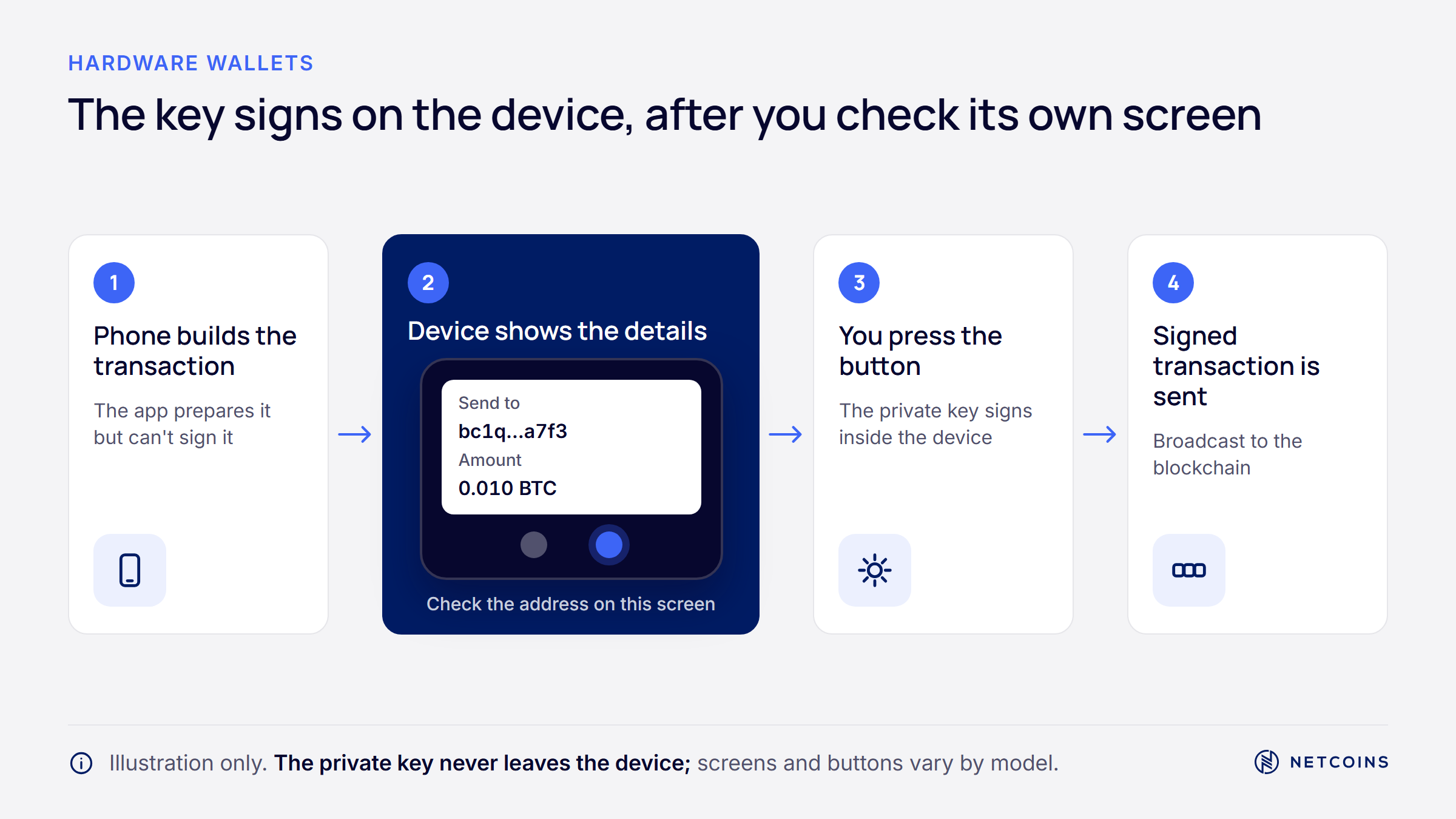
The process usually follows four steps:
- Build: A companion app on your phone or computer checks your balance and prepares an unsigned transaction.
- Transfer: The unsigned transaction goes to the device by USB, Bluetooth, NFC, or, on some models, a QR code.
- Review and approve: The device shows the details on its own screen, such as the recipient address, amount, and network fee. You confirm with a physical button or touch.
- Sign and broadcast: The device signs and returns the signed transaction. The companion app sends it to the blockchain.
The device's own screen is the most important safety feature. Malware on a computer can change what the computer shows you, but it cannot easily change what the hardware wallet's screen shows. If the address on the device does not match the address you intended, you should not approve.
A simple habit helps. Before sending $500 worth of bitcoin to a friend in Winnipeg, compare the first and last several characters of the address on the device screen with the address your friend gave you through a separate channel. Address-swapping malware relies on people skipping that check.
There are limits. The screen can only show what the device can decode, and the device cannot judge whether the person or app you are paying is honest. If you approve a payment to a scammer's correct address, the device will sign it. Our guide to common Bitcoin scams in Canada covers the social-engineering tactics that hardware wallets cannot stop.
Secure Elements, Certifications, and Physical Attacks
Many hardware wallets store keys inside a secure element, a tamper-resistant chip similar to those used in passports and payment cards, which is designed to resist someone who physically has the device.
Some devices use a general-purpose microcontroller instead, or a mix of chips. General-purpose chips are built for flexibility, not to resist lab attacks. Researchers have shown that, with physical access and specialist equipment, some of them can be pushed into revealing secrets.
Secure elements add defences against two main kinds of physical attack:
- Side-channel analysis: Measuring tiny changes in power use or electromagnetic signals while the chip signs, then working backward to the key. Secure elements try to make these signals look the same no matter what data they process.
- Fault injection: Disrupting the chip at an exact moment, for example with a voltage drop or a focused laser, so it skips a security check. Secure elements include sensors that detect these conditions and reset or wipe the chip.
Secure elements are often evaluated under Common Criteria, an international security standard. It defines seven evaluation assurance levels, from EAL1 (functionally tested) to EAL7 (formally verified design and tested) [Source]. Wallet chips are commonly marketed at EAL5+ or EAL6+, where the "+" means extra testing was added.
A chip certification applies to the evaluated product, version, and security scope. It should not be read as certification of the entire wallet or as a guarantee against loss. Check the certificate's scope rather than assuming it covers the device, firmware, display, and key generation. The 2026 incidents below illustrate risks outside the scope of a security chip's protection.
For a Canadian shopping online, it helps to read a device's security claims carefully and look for independent research, not just marketing labels. Open-source firmware, published security audits, and a clear history of fixing problems are all useful signals.
Supply Chain Risk: Lessons From the 2026 Implant Attack
A supply chain attack involves tampering with a device before it reaches the user and may undermine protections without defeating the security chip.
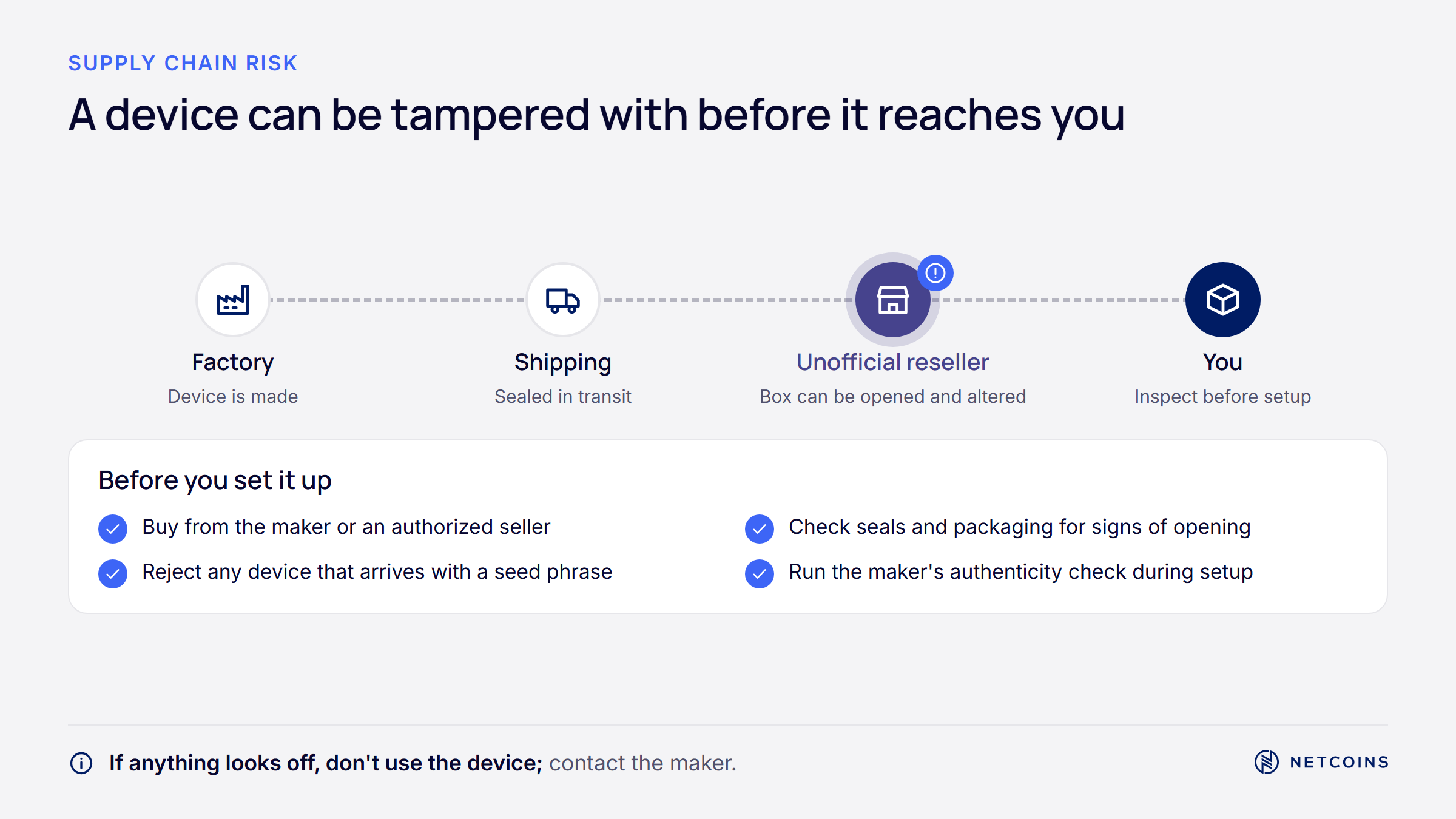
In October 2026, Ledger reported that some of its devices sold through CryptoBilis, a reseller in Southeast Asia, contained a hidden implant. When the device displayed the 24-word recovery phrase during setup, the implant read the words from the screen and sent them over a mobile network using an eSIM. Ledger said the implant did not modify the device's secure element or operating system [Source].
On-chain researchers estimated losses of up to about US$93 million across roughly 300 wallets [Source]. Because the security chip was untouched, devices could still pass authenticity checks. The weak point was the path between the chip and the screen, and the reseller channel the devices travelled through.
The lessons apply to any brand:
- Buy from the manufacturer or an authorized seller you can verify. Avoid used devices and third-party marketplace listings. For Canadians, ordering directly from an overseas manufacturer can mean customs fees and longer shipping, which is a trade-off some buyers accept.
- Inspect packaging and the device. Look for broken seals or signs the casing was opened, and follow the manufacturer's own inspection guidance.
- Never use a recovery phrase that came with the device. A legitimate wallet generates the phrase on first setup. Pre-printed phrases are a sign of tampering.
- Watch for official warnings. If a manufacturer flags a seller, follow its instructions, which in this case included moving funds to a new device with a new recovery phrase.
Seed Phrases, Randomness, and Backups
A recovery phrase, also called a seed phrase, is a list of 12 or 24 words that can recreate every key in your wallet, so whoever sees it can take your funds.
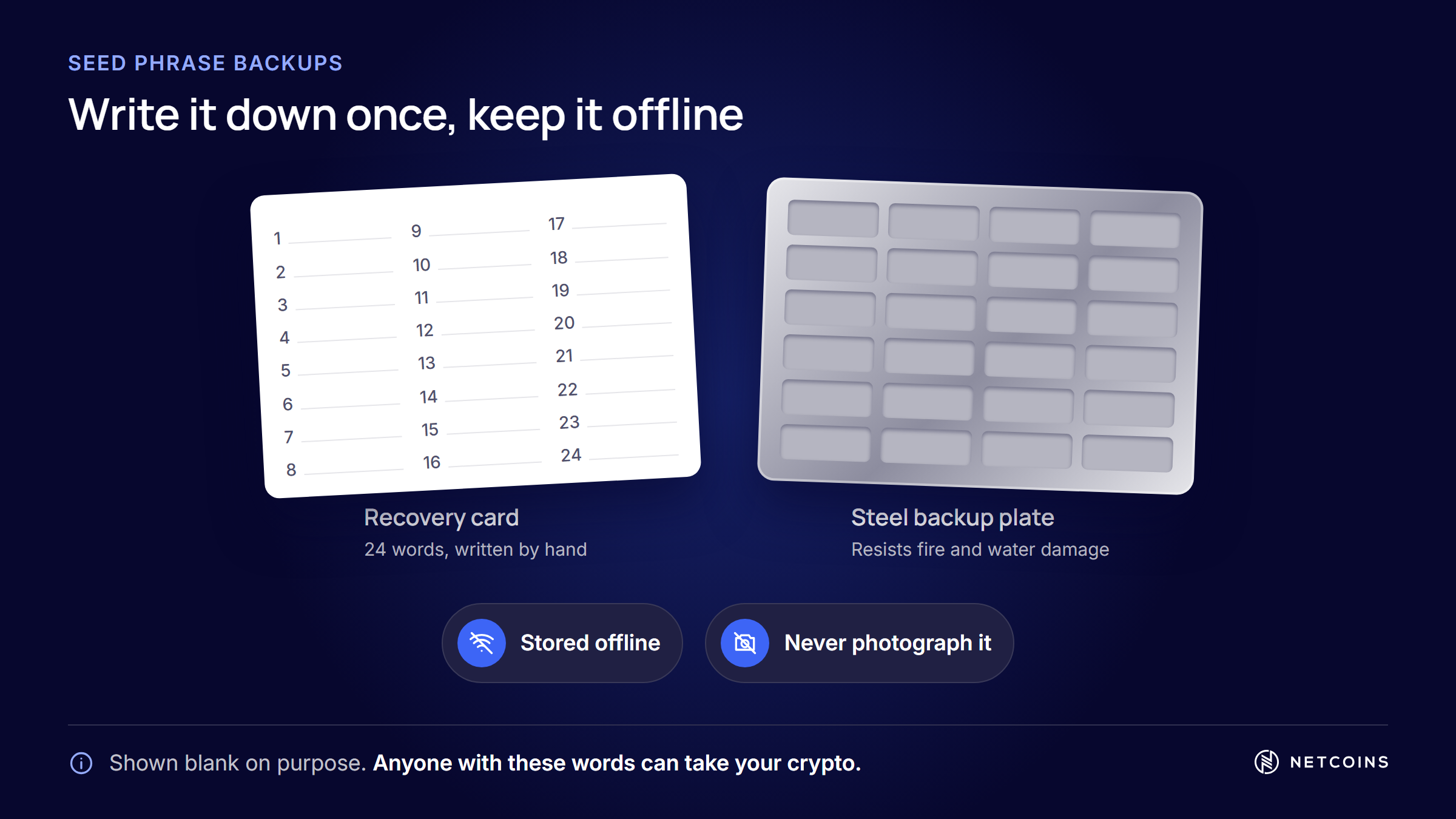
Most wallets follow a standard called BIP39. Its English list has 2,048 words, chosen so the first four letters identify each word [Source]. That is why some metal backup tools only stamp four letters per word.
How you store the phrase matters as much as the device. A few widely followed practices:
- Keep it offline. Never type it into a website, photo, cloud note, or chat. No legitimate company will ask for it.
- Protect it from damage. Paper can burn or fade. Some people stamp or engrave the words on stainless steel plates or tiles to resist fire and water.
- Plan for access. Think about where the backup is stored and who could reach it if something happens to you, without giving anyone easy access today.
Randomness is the other half of the story. A seed phrase is only as strong as the randomness used to create it. In 2026, a flaw in some Coldcard hardware wallet firmware caused seeds to be generated with too little randomness, letting attackers recreate keys from public data. The Block reported that researchers had confirmed 1,596 BTC stolen from about 7,300 addresses, with total losses possibly reaching about US$130 million [Source].
This case is a reminder that firmware updates cannot fix a seed that was already created weakly. Affected users were told to create a new seed and move their funds. Some wallets let users add their own randomness, such as dice rolls, during setup. For anyone in Canada or elsewhere, keeping firmware current and acting quickly on official security notices is part of self-custody.
Blind Signing, Clear Signing, and DeFi
Blind signing means approving a transaction your device cannot fully display, and it is one of the biggest risks when connecting a hardware wallet to DeFi apps.
Simple transfers are easy to show on a small screen. Smart contract actions, such as token approvals or swaps, often are not. Without the right decoding data, a device may show only a technical summary or a code string. If you approve it anyway, you may be granting an app permission to move your tokens. Phishing sites rely on this by disguising malicious approvals as routine actions.
The risk is not limited to individuals. In February 2025, a large international crypto trading platform lost about US$1.5 billion after attackers compromised the software interface its signers used, so a malicious transaction looked like a routine transfer [Source]. The incident illustrates that multiple signatures do not prevent loss when the required signers authorize a malicious transaction.
The industry response is clear signing, which turns raw contract data into plain-language descriptions on the device. On Ethereum, a standard called ERC-7730 supports this [Source]. Clear signing helps only when the app and device support it, so it is not yet universal.
Network design also affects what you can verify. On Cardano, for example, a transaction's result and fee can be calculated before it is sent, though a failed smart contract script can still cost the user collateral [Source]. Our guide to what Cardano is and how ADA works explains that model.
For a user in Montreal trying a DeFi app for the first time, practical steps include checking the site address, reading every approval, limiting token allowances, and starting with a small amount. Our guide to what DeFi is and how it works for Canadians covers these risks in more depth.
Multisig, Staking, and Choosing a Setup
Multisignature, or multisig, wallets require several keys to approve a transaction, which can reduce reliance on a single signing key when the keys and backups are independently secured.
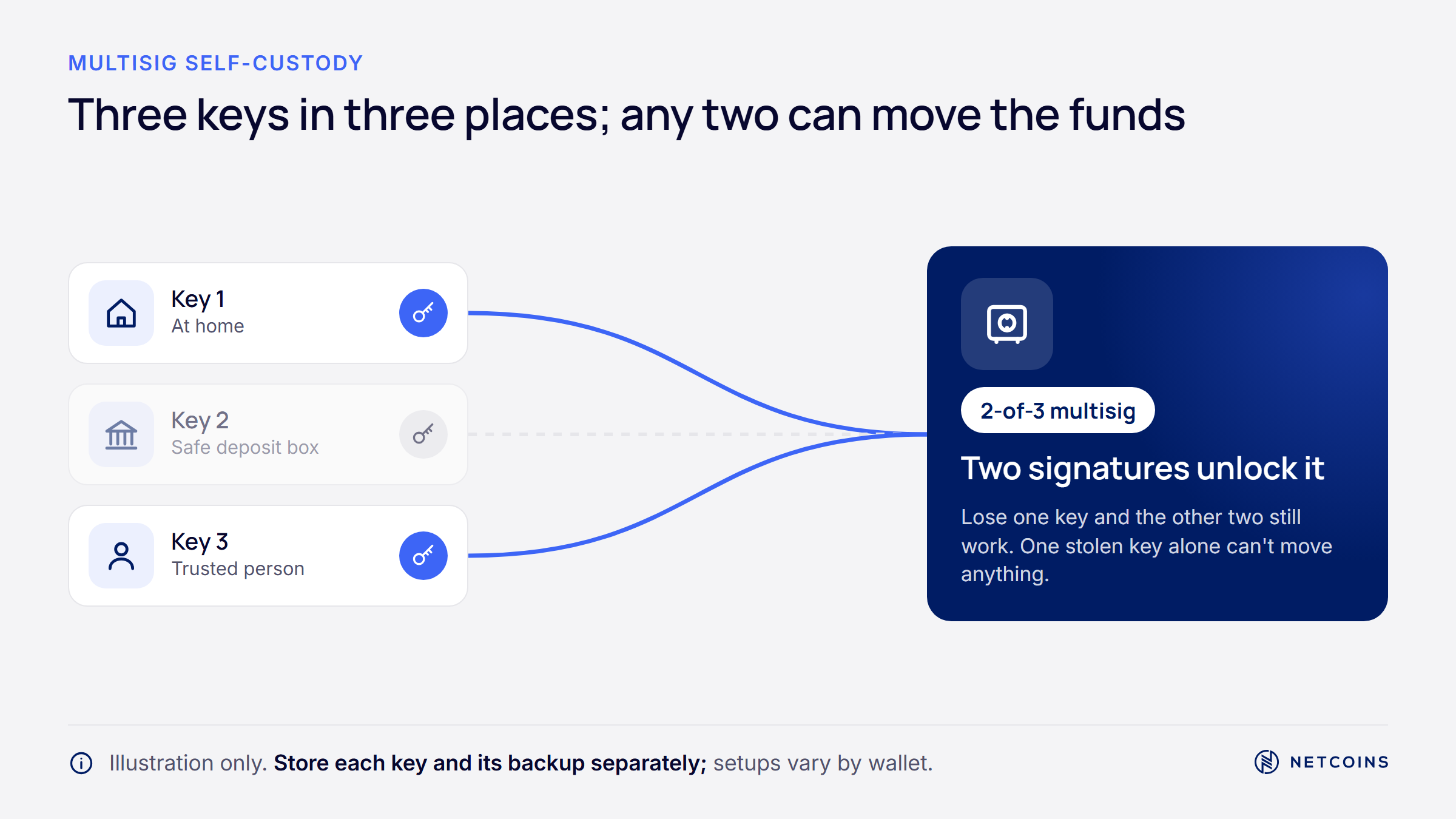
A common example is "2-of-3": three keys exist, and any two can approve a transaction. If one device is lost, stolen, or affected by a vendor flaw, the other two keys may still permit recovery, provided they remain secure and the required wallet configuration and recovery information are available. Some people use devices from different manufacturers so that one brand's problem does not affect every key. Multisig is more complex to set up and recover, so mistakes in the setup itself are a real risk.
Hardware wallets can also sign staking actions on some networks. On Cardano, for example, delegating ADA to a stake pool leaves the ADA in your wallet, and the protocol does not slash delegated ADA [Source]. Other networks work differently, with lock-up periods or penalties. Staking rewards are never guaranteed and are paid in the network's own token, whose value can fall. Our guide to crypto staking in Canada and its risks explains the differences.
When comparing setups, these questions can help:
- How much and how often? Funds you trade often may sit on a platform, while funds you rarely touch may suit self-custody.
- Can you manage backups? Self-custody gives you more direct control, but losing the recovery phrase can mean losing the funds permanently.
- Which networks do you use? Check that a device supports your assets and can clearly display the transactions you plan to sign.
- What is the device's track record? Look at independent audits, open-source code, and how the maker has handled past security issues.
If you keep crypto on a platform instead, check whether it is registered with the applicable Canadian securities regulators and review its custody, fee, and risk disclosures.
People Also Ask About Hardware Wallets in Canada
Is a hardware wallet worth it?
It depends on how much crypto you hold, how often you move it, and whether you are comfortable managing a recovery phrase. A hardware wallet can reduce the risk of keys being stolen from an online device, and it gives you more direct control over your funds. It also makes you fully responsible for backups and for every transaction you approve. Some people keep trading funds on a platform and long-term holdings in self-custody. There is no single right answer for everyone.
Can a hardware wallet be hacked?
Yes, hardware wallets can be compromised, though usually not by remote hackers reading keys from the device. In 2026, a supply chain implant captured recovery phrases from devices sold by one reseller, and a firmware flaw in another brand created weak seeds that attackers could recreate. Phishing that tricks users into revealing their recovery phrase or approving malicious transactions is another common route. Buying from trusted sources, protecting your phrase, updating firmware, and reading every approval reduce these risks but do not remove them.
What happens if I lose my hardware wallet?
If you lose the device but still have your recovery phrase, you can usually restore your wallet on a new compatible device and regain access to your funds. Your crypto stays on the blockchain, not on the device. If someone else finds the lost device, a PIN helps protect it, but you may want to move funds to a new wallet with a new recovery phrase to be safe. If you lose both the device and the recovery phrase, the funds are generally unrecoverable.
Where should Canadians buy a hardware wallet?
Hardware wallet makers commonly advise buying directly from the manufacturer or from an authorized seller you can verify, rather than from used listings or third-party marketplaces. The 2026 implant attack involved devices sold through a single reseller, which shows how the supply chain can be targeted. Ordering from an overseas manufacturer may involve customs fees and longer delivery to Canada. When the device arrives, inspect the packaging and make sure it generates a new recovery phrase during setup.
Do I need a hardware wallet if I use a Canadian crypto trading platform?
Not necessarily, because a custodial trading platform or its custody providers manage the keys, which is a different custody model with its own risks and benefits. Platform custody means relying on the provider's security, operations, and solvency. Self-custody means relying on yourself to protect your keys and recovery phrase. Before choosing a platform, check whether it is registered with the applicable Canadian securities regulators and review its custody, fee, and risk disclosures. Some people use both approaches for different amounts.
Frequently Asked Questions
What is a seed phrase?
A seed phrase is a list of 12 or 24 words that can recreate all the private keys in a crypto wallet. Most wallets follow the BIP39 standard, which uses a list of 2,048 words. Anyone who sees your seed phrase can take your funds, so it should never be typed into a website, photographed, or stored in the cloud. Many people store it offline on paper or metal, in a place protected from fire, water, and other people.
What is blind signing?
Blind signing means approving a transaction that your hardware wallet cannot fully display in readable form. It often happens with smart contract actions such as token approvals. Attackers exploit it by disguising malicious approvals as routine actions, which can give them permission to move your tokens. Clear signing, supported by standards such as ERC-7730 on Ethereum, translates these actions into plain language on the device. If you cannot understand what you are approving, it is safer not to sign.
What is a secure element?
A secure element is a tamper-resistant chip, similar to those in passports and payment cards, that stores secrets and resists physical attacks. It includes defences against side-channel analysis and fault injection, and it is often certified under the Common Criteria standard at levels such as EAL5+ or EAL6+. A secure element protects keys stored inside the chip, but it does not protect against weak key generation, tampered screens, or a user approving a malicious transaction.
What is a multisig wallet?
A multisig wallet requires more than one key to approve a transaction, such as two out of three keys. This can reduce reliance on a single signing key, provided the keys and backups are independently secured; shared software and approval risks remain. If one key is lost or compromised, recovery depends on retaining the required signing threshold and wallet configuration information. Some users choose devices from different manufacturers for each key. Multisig is more complex to set up and recover, so careful planning and testing are important.
Can I stake crypto from a hardware wallet?
On some networks, yes. On Cardano, for example, a hardware wallet can sign a delegation to a stake pool while the ADA stays in your wallet, and the protocol does not slash delegated ADA. Other networks have different rules, including lock-up periods or penalties. Staking rewards are not guaranteed and are paid in the network's own token, which can lose value. Check that your device and wallet app support staking on the network you use before trying it.
Quick Glossary
Private key: A secret number that proves you are allowed to move the crypto at a blockchain address.
Seed phrase (recovery phrase): A list of 12 or 24 words that can recreate all the private keys in a wallet.
Self-custody: Holding your own private keys instead of relying on a custodial platform or its custody providers to manage them.
Secure element: A tamper-resistant chip designed to store secrets and resist physical attacks.
Supply chain attack: Tampering with a device before it reaches the buyer, for example by adding hidden hardware.
Blind signing: Approving a transaction your device cannot fully display in readable form.
Clear signing: Showing a smart contract action in plain language on the device before you approve it.
Multisig: A wallet setup that needs several keys, such as two out of three, to approve a transaction.

About Netcoins
Established in 2014 in Vancouver, British Columbia, Netcoins is a registered Restricted Dealer with the provincial securities commissions and a registered Money Services Business (MSB) with FINTRAC. Netcoins is owned by Surge Digital Inc. (formerly BIGG Digital Assets Inc.), a publicly traded company listed on the TSX Venture Exchange (TSXV: SRGE), and complies with applicable public company regulatory.
The information provided in the blog posts on this platform is for educational purposes only. It is not intended to be financial advice or a recommendation to buy, sell, or hold any cryptocurrency. Always do your own research and consult with a professional financial advisor before making any investment decisions. Cryptocurrency investments carry a high degree of risk, including the risk of total loss. The blog posts on this platform are not investment advice and do not guarantee any returns. Any action you take based on the information on our platform is strictly at your own risk. The content of our blog posts reflects the authors’ opinions based on their personal experiences and research. However, the rapidly changing and volatile nature of the cryptocurrency market means that the information and opinions presented may quickly become outdated or irrelevant. Always verify the current state of the market before making any decisions.


